
Last updated on
Nov 9, 2026
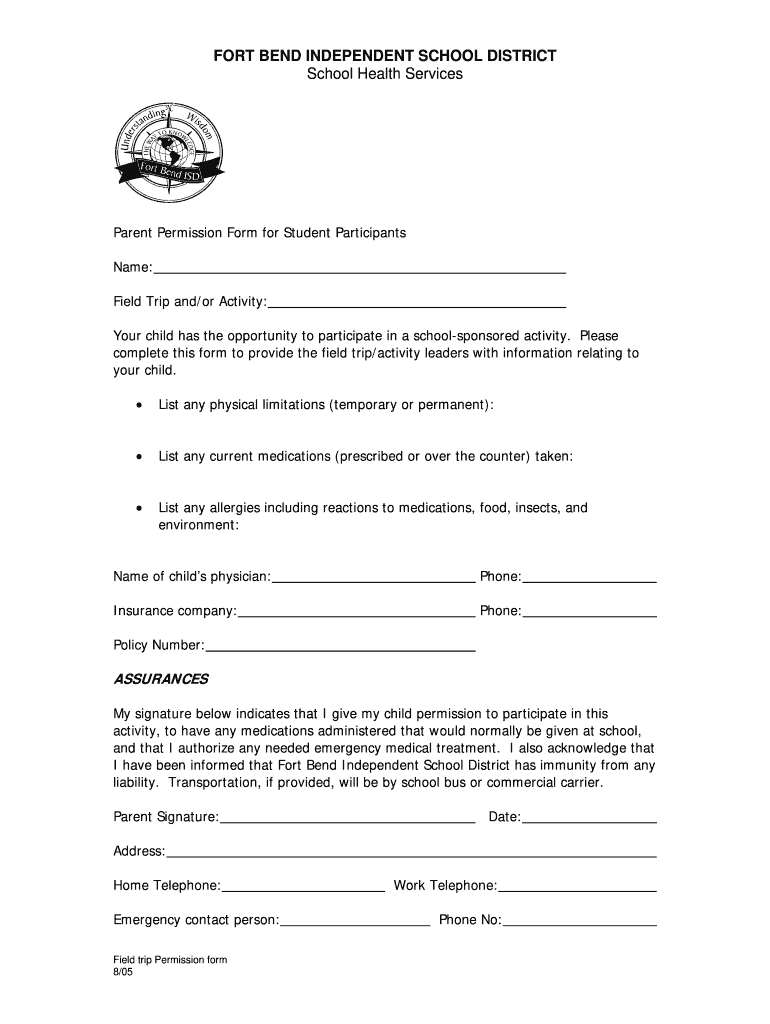
TX Fort Bend Independent School District Parent Permission Form for Student Participants 2005-20...
pdfFiller is not affiliated with any government organization

Fill out
Complete the form online in a simple drag-and-drop editor.

eSign
Add your legally binding signature or send the form for signing.

Share
Share the form via a link, letting anyone fill it out from any device.

Export
Download, print, email, or move the form to your cloud storage.
Why pdfFiller is the best tool for your documents and forms


End-to-end document management
From editing and signing to collaboration and tracking, pdfFiller has everything you need to get your documents done quickly and efficiently.
Accessible from anywhere
pdfFiller is fully cloud-based. This means you can edit, sign, and share documents from anywhere using your computer, smartphone, or tablet.
Secure and compliant
pdfFiller lets you securely manage documents following global laws like ESIGN, CCPA, and GDPR. It's also HIPAA and SOC 2 compliant.
What is TX Fort Bend Independent School District Parent Permission Form for Student Participants
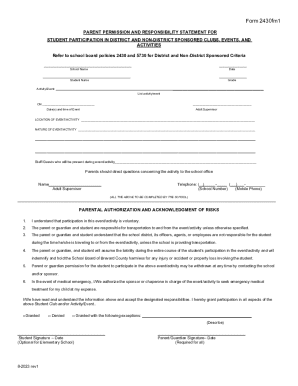
The Parent Permission Form for Student Participants is a permission document used by parents to provide consent for their children to engage in school-sponsored activities.
pdfFiller scores top ratings on review platforms




Who needs TX Fort Bend Independent School District Parent Permission Form for Student Participants?
Explore how professionals across industries use pdfFiller.

TX Fort Bend Independent School District Parent Permission Form for Student Participants is needed by:
-
Parents of students participating in school activities
-
School administrators at Fort Bend Independent School District
-
Teachers organizing field trips and school events
-
Health professionals reviewing student medical needs
-
Emergency contacts for students
-
Insurance providers requesting liability information
Comprehensive Guide to TX Fort Bend Independent School District Parent Permission Form for Student Participants
What is the Parent Permission Form for Student Participants?
The Parent Permission Form for Student Participants is crucial for the Fort Bend Independent School District. This form serves as a means to obtain parental consent, ensuring that students can participate in various school activities, from field trips to extracurricular events. The primary purpose of the form is to protect students, allowing parents to provide essential information that contributes to their child’s safety and well-being.
Obtaining parental consent is a legal requirement that reinforces the importance of communication between the school and families. It ensures that parents are informed and involved in their child's educational experiences, which ultimately fosters a supportive learning environment.
Purpose and Benefits of the Parent Permission Form for Student Participants
This form plays a vital role in protecting students' rights while participating in school activities. Specifically, it collects crucial medical and emergency information from parents to safeguard their children during school-sponsored events. By providing this information, parents contribute to ensuring that appropriate measures are in place to care for their child.
Some key benefits of the Parent Permission Form include:
-
Protection of students' rights and well-being
-
Collection of important medical information
-
Facilitation of emergency medical readiness
-
Transparency in the school’s liability measures
Key Features of the Parent Permission Form for Student Participants
The Parent Permission Form contains several essential fillable fields that each contribute to a comprehensive understanding of a student's needs. Some of these fields include:
-
Name of the student
-
Details regarding physical limitations
-
Current medications
-
Allergies
-
Emergency contact information
These fields are vital for schools to prepare adequately and respond effectively in case of emergencies, reinforcing the importance of accurate and complete submissions from parents.
Who Needs the Parent Permission Form for Student Participants?
The target audience for the Parent Permission Form primarily includes parents and guardians of students participating in school activities. The form is especially required in situations such as:
-
Field trips
-
Extracurricular activities
By clarifying who needs to fill out the form, schools ensure that all necessary approvals are in place, alleviating potential concerns about participation in school events.
How to Fill Out the Parent Permission Form for Student Participants Online
Filling out the Parent Permission Form online is straightforward. Here are step-by-step instructions to guide you through the process:
-
Access the form via pdfFiller or a similar platform.
-
Locate the fillable fields and begin inputting the required data.
-
Provide accurate details for medical information, emergency contacts, and parent signatures.
-
Review the completed form to ensure all necessary information is included.
-
Submit the form electronically following the specified submission guidelines.
Common Errors When Completing the Parent Permission Form
Many parents encounter common mistakes while filling out the Parent Permission Form. Some frequent errors include:
-
Leaving fields incomplete
-
Providing outdated medical information
-
Failing to sign the form
To ensure timely submission and approval, parents should double-check their entries and follow the instructions carefully to avoid these pitfalls.
How to Sign the Parent Permission Form for Student Participants
When signing the Parent Permission Form, parents have options for digital signatures, providing flexibility in how they authorize their consent. Key differences to note include:
-
Digital signatures offer the convenience of signing from any location.
-
Traditional 'wet' signatures often require printing and mailing the form back to the school.
Understanding these options can streamline the submission process and enhance overall efficiency.
Where to Submit the Parent Permission Form for Student Participants
Parents have several submission methods for the Parent Permission Form. It can be submitted electronically through the school’s designated platform or delivered physically to the school office. It is crucial to be aware of submission deadlines, as timely submission can affect a student's eligibility for participation in planned activities.
Security and Privacy of Your Information on the Parent Permission Form
Ensuring the security and privacy of sensitive information is paramount when using the Parent Permission Form. pdfFiller employs robust security features, including:
-
256-bit encryption for data protection
-
Compliance with HIPAA and GDPR regulations
-
SOC 2 Type II certification
These attributes provide assurance to parents that their information is handled responsibly and securely.
Streamlining Your Experience with pdfFiller for the Parent Permission Form
Utilizing pdfFiller enhances the experience of completing and submitting the Parent Permission Form. The platform offers features such as eSigning capabilities and effective document management that simplify the overall process. By leveraging these tools, parents can ensure a smooth experience while managing important school-related documentation.
How to fill out the TX Fort Bend Independent School District Parent Permission Form for Student Participants
-
1.To access the Parent Permission Form for Student Participants on pdfFiller, visit the website and enter the form name in the search bar to find it easily.
-
2.Once the form appears, click on it to open the document in the pdfFiller editor. Familiarize yourself with the fillable fields provided.
-
3.Before completing the form, gather all necessary information such as your child's physician contacts, any current medications, physical limitations, and emergency contact details.
-
4.Start filling out the form by entering your child's name in the designated field. Move through the document by clicking into each field to type.
-
5.Fill in the details regarding the field trip or activity your child will participate in, ensuring you clearly specify any physical limitations or allergies.
-
6.Ensure you provide accurate information for the insurance company and policy number, which might be essential in case of emergencies.
-
7.After completing all fields, carefully review the form to confirm that all information is correct and complete.
-
8.Finally, save the completed form on pdfFiller, which allows you to download it in your preferred format or submit it directly through the platform.

Who needs to fill out the Parent Permission Form?
The Parent Permission Form must be filled out by parents or guardians of students participating in school-sponsored activities, such as field trips or other events organized by Fort Bend Independent School District.
Is there a deadline for submitting this form?
Yes, it is important to submit the Parent Permission Form as soon as possible, ideally before the activity takes place. Check with the school for any specific deadlines associated with upcoming events.
How do I submit the completed form?
Once completed, you can submit the Parent Permission Form by downloading it from pdfFiller and delivering it to your child's school, or, if available, you may submit it electronically through the school's designated submission portal.
What supporting documents are required with the form?
Typically, supporting documents may include copies of emergency contact information or medical records if there are specific health concerns that need to be noted on the form. Always check with the school for specific requirements.
What are common mistakes to avoid when filling this form?
Common mistakes include forgetting to sign the form, omitting critical health information about your child, or failing to provide accurate emergency contact details. Be thorough to avoid any delays or issues.
How long does it take for the school to process the permission forms?
Processing times may vary by school but generally take a few days to a week. It's best to submit the form early to ensure timely approval for participation in school activities.
Can I edit the form after submission?
Once submitted, you may need to contact the school directly to make any changes. It is advisable to review and finalize all details before submission to avoid the need for edits.
Related Content
Related Forms





Related Catalogs
Get the latest insights from our blog


If you believe that this page should be taken down, please follow our DMCA take down process
here
.
This form may include fields for payment information. Data entered in these fields is not covered by PCI DSS compliance.